
Search PDF - Incremental Text Search in PDF Documents
Text search has been one of the most requested features in earlier PDF Annotator releases. So, in PDF Annotator 2, we introduced the Search toolbar, which implements incremental search, as you know it from current web browsers. In this issue, we'll have a quick look at its capabilities.
To bring up the Search toolbar, select Edit, Find... from the menu, or hit CTRL-F, which is the
common shortcut for text search.
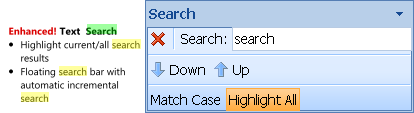
Working with the Search toolbar is pretty straight forward. Type the text you want to find in the current document
into the Search text box and hit ENTER. But even if you don't hit the ENTER key, you'll notice that
text search will automatically start if you pause typing. This is what they call incremental search.
PDF Annotator will start its search on the page you're currently viewing. It will then jump to the position of the
first occurrence--once it reaches the document's last page, it'll restart on the first page and continue its search.
The text found will be highlighted in green, as you see on the example above. With the Highlight All
option being on, it will highlight all other occurrences in yellow, at the same time. To walk through all
occurrences, just hit ENTER multiple times or click the Down button on the toolbar. Same to walk up using the
Up button.
Once you close the Search toolbar by pressing ESC, or by clicking the red X button on the toolbar, all
highlighting of search results will be cleared.